


In WooCommerce subscription products and standard products can’t be combined. For example, if you’d like to offer customers the option to purchase coffee as a one-time sale or as a convenient monthly subscription, you’ll need to create two separate products on the backend (even though it’s essentially the same product and SKU).
If you’re SEO focused, this might be a concern in terms of duplicate content and splitting page rank. For customers, this also isn’t a great experience. If a customer lands on the one-time product page, they might not know about the subscription option (and vicea versa).
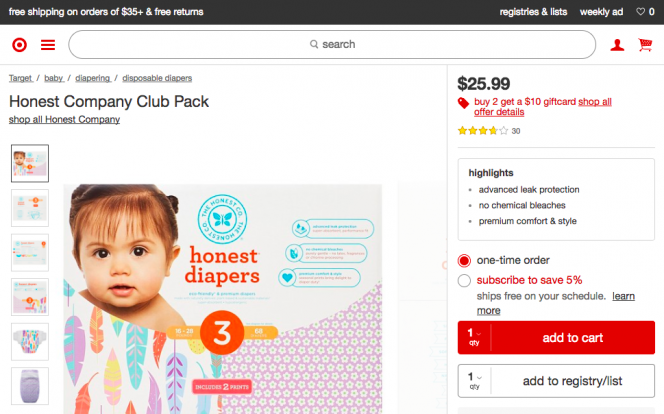
A better example of subscription user experience is Target. If a product offers a subscription option, there’s a radio button toggle with a discount clearly highlighted. Turns out, with a little work, this is also possible to do in WooCommerce.
How to Implement a Subscription Toggle in WooCommerce
Here’s an example from a WooCommerce site. As you can see, the price and button text change when the radio button is toggled. When a customer clicks the “Subscribe” or “Add to Cart” button, the appropriate product is added to the cart.
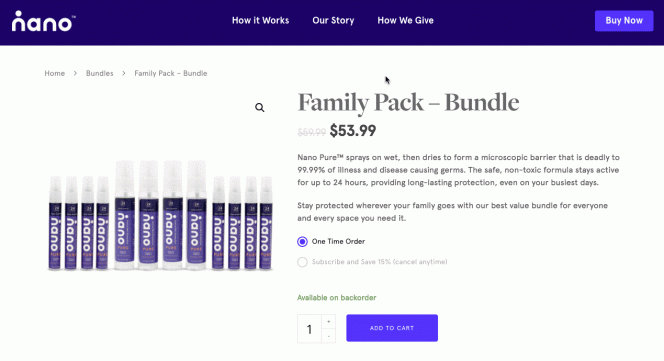
This implementation still uses two products (a standard and subscription), but additional markup and javascript is added to standard product so that it can pull in pricing and update the cart for the linked subscription product.
Setting Up Product Links
WooCommerce products already have a tab for “Linked Products”, so this is where I’ve added an additional field for “Linked Subscription”.
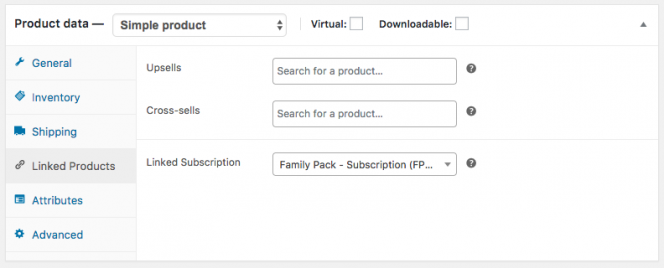
The following code adds a field for selecting a linked subscription product + sanitizing/saving the input:
[gist id=”e69ca70b4c0a859f7ed759a3225e6aff” file=”subscription-toggle.php” lines=”9-47″]
Displaying the Toggle
The code below is what displays the subscription toggle for products that have a linked subscription. This will likely require some minor tweaks to work correctly with your site (as markup might be different and styling might be needed)- but it should at least get you set in the right direction.
This method works by querying the linked product to get the pricing information and product ID. Then these attributes are swapped out with javascript when someone toggles between products (the discount is hardcoded at the moment, but could also be made to be dynamic).
[gist id=”e69ca70b4c0a859f7ed759a3225e6aff” file=”subscription-toggle.php” lines=”49-115″]
Last Steps
- 301 redirect all the subscription products to the standard product
- Filter the linked subscription products so they don’t display in your shop archives or search
Conclusions
Although creating two separate products requires a bit of additional effort by admins, I doubt many stores offer subscriptions for more than a few items and this method should perfectly address that use case. Have suggestions to improve the code? Leave them below or comment on the gist on GitHub.


Leave a Reply